Live Tracking - MapRunView - FOR MAPRUN ADMINISTRATORS ONLY
MapRun allows Administrators to see runners using MapRun6 in real-time as they participate in an event... ie "Live Tracking".
This is currently a restricted service, and due to the extra backend services required, it is generally arranged by purchasing a "subscription".
Live tracking is available at the MapRunView website: https://live.maprun.net
MapRunView
Installing
No installation is required as MapRunView (Live Tracking) is a Web App.
Logging In
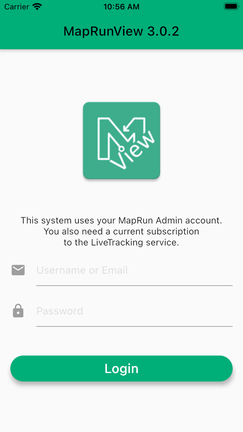
Log in with your MapRun Administrator account. You can use your username or the associated email address.
This is currently a restricted service, and due to the extra backend services required, it is generally arranged by purchasing a "subscription".
Live tracking is available at the MapRunView website: https://live.maprun.net
MapRunView
Installing
No installation is required as MapRunView (Live Tracking) is a Web App.
Logging In
Log in with your MapRun Administrator account. You can use your username or the associated email address.
Selecting An Event.
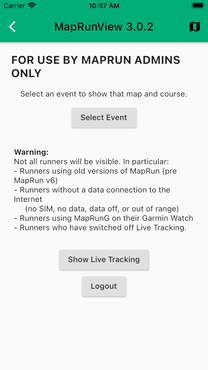
After logging in, the following screen is presented.
“Select Event” on this screen loads the event from the MapRun server so that the Map and Course are shown as the background to the live tracking. Then tap “Show Live Tracking”
After logging in, the following screen is presented.
“Select Event” on this screen loads the event from the MapRun server so that the Map and Course are shown as the background to the live tracking. Then tap “Show Live Tracking”
Live Tracking
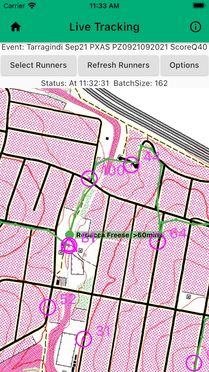
The event selected in the previous screen, it should now be displayed.
It may take a few moments for the pre-selected event name to appear under the “Select Runners” button.
No runners tracks will be displayed until runners are selected by tapping the "Select Runners" button.
If a location has been received for a runner within the last 3 minutes, their name will simply be displayed near a point showing their location.
If no data has been received in the last three minutes, the runner's name will be followed by the time in minutes since a location point was last received.
Select Runners
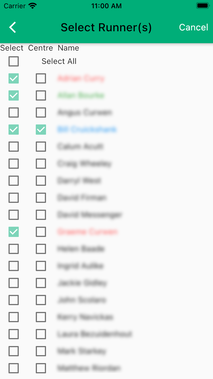
The list of runners shows all runners for whom we have data in this event, at this point in time. See the section on refreshing the runners list below.
You can select multiple runners and select one to be kept in the centre of the screen as new data comes in.
The "Select All" checkbox allows a quick selection of all runners. Individual runners can then be unchecked if desired.
Tap the back-arrow to return to the map screen with your selections.
It may take a few moments for the tracks for the selected runners to appear.
Also, it may be necessary to change the "Options" to see runners tracks. (See below).
Refresh Runners
To see additional runners who started sending locations AFTER you have opened the "Live Tracking" view, tap the "Refresh Runners" button. After doing this, you will need to re-select the runners you wish to track by tapping "Select Runners".
The list of runners shows all runners for whom we have data in this event, at this point in time. See the section on refreshing the runners list below.
You can select multiple runners and select one to be kept in the centre of the screen as new data comes in.
The "Select All" checkbox allows a quick selection of all runners. Individual runners can then be unchecked if desired.
Tap the back-arrow to return to the map screen with your selections.
It may take a few moments for the tracks for the selected runners to appear.
Also, it may be necessary to change the "Options" to see runners tracks. (See below).
Refresh Runners
To see additional runners who started sending locations AFTER you have opened the "Live Tracking" view, tap the "Refresh Runners" button. After doing this, you will need to re-select the runners you wish to track by tapping "Select Runners".
Options
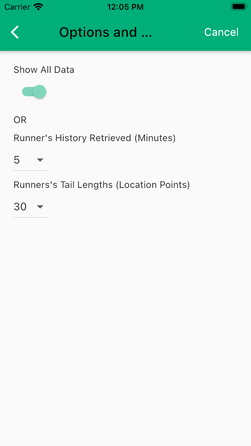
The Options button presents this screen. Typically, runners who are currently active in the event will have their current location shown with a tail that is limited by the settings on this page:
- Time: only locations recorded in the last x minutes will be retrieved from the database, AND
- Tail Length: the maximum number of data points displayed is also used.
The implication of this is that with a setting of 5 minutes, then after each runner has completed the event, they will no longer be displayed (from 5 minutes after their last recorded location).
To see ALL recorded data in the event turn the "Show All Data" switch.
The Options button presents this screen. Typically, runners who are currently active in the event will have their current location shown with a tail that is limited by the settings on this page:
- Time: only locations recorded in the last x minutes will be retrieved from the database, AND
- Tail Length: the maximum number of data points displayed is also used.
The implication of this is that with a setting of 5 minutes, then after each runner has completed the event, they will no longer be displayed (from 5 minutes after their last recorded location).
To see ALL recorded data in the event turn the "Show All Data" switch.
Known Issues
When a runner goes off-line (loses connection with the Internet), data is queued on the device and then sent when a connection is re-established. It seems that the rate at which this data is sent can be quite slow on some devices… and so it takes a few minutes to catch up for each minute offline.
Future Plans
If Beta testing goes well, this system may be made generally available to Administrators. Given the extra resources it is expect that a subscription model will continue to be used and a price reflective of operating costs will be determined. For example: $20/month or $10/week (TBC). Subscriptions are NOT recurrent, that is, if you pay for say 3 x one week for $30, at the end of the third week the service will become unavailable (and NOT auto-renew).
A web-based version of MapRunView is proposed so that a PC/Mac could be used as the display device (whilst still requiring Admin login).
Caveats
Don’t use this system as the only safety mechanism for an event.
MapRunView will NOT give a complete view of all runners. Some the main reasons are:
This software is in Beta testing and no guarantees are provided.
Feedback
Comments/Suggestions are encouraged. Please let us know if you have any issues
When a runner goes off-line (loses connection with the Internet), data is queued on the device and then sent when a connection is re-established. It seems that the rate at which this data is sent can be quite slow on some devices… and so it takes a few minutes to catch up for each minute offline.
Future Plans
If Beta testing goes well, this system may be made generally available to Administrators. Given the extra resources it is expect that a subscription model will continue to be used and a price reflective of operating costs will be determined. For example: $20/month or $10/week (TBC). Subscriptions are NOT recurrent, that is, if you pay for say 3 x one week for $30, at the end of the third week the service will become unavailable (and NOT auto-renew).
A web-based version of MapRunView is proposed so that a PC/Mac could be used as the display device (whilst still requiring Admin login).
Caveats
Don’t use this system as the only safety mechanism for an event.
MapRunView will NOT give a complete view of all runners. Some the main reasons are:
- Runners using MapRunG (on their Garmin Watch) are not tracked. Garmin do have a “LiveTrack” feature, if you carry a phone with you… but this is not integrated with MapRun.
- The older App, MapRunF is not supported in this version of MapRunView. Unfortunately I can’t retrospectively stop that App from being used in an Event.
- Also people can still:
- Run without a SIM
- Run with data switched Off, or
- Switch off live tracking
- Runners phone batteries can run flat.
This software is in Beta testing and no guarantees are provided.
Feedback
Comments/Suggestions are encouraged. Please let us know if you have any issues